WhatsApp integration with CRM in Uspacy
WhatsApp for business is a convenient channel where customers can quickly ask questions, clarify order details, discuss services, or return to a previous conversation. However, without a unified system, messages can get lost between phones, messaging apps, and CRM, and the team may not always have the full context of customer communication.
WhatsApp integration with CRM Uspacy helps you receive WhatsApp messages in the Workspace External Channels, reply to customers, and connect communication with CRM processes. This way, customers can continue using their preferred messenger, while the team manages inquiries systematically in Uspacy.
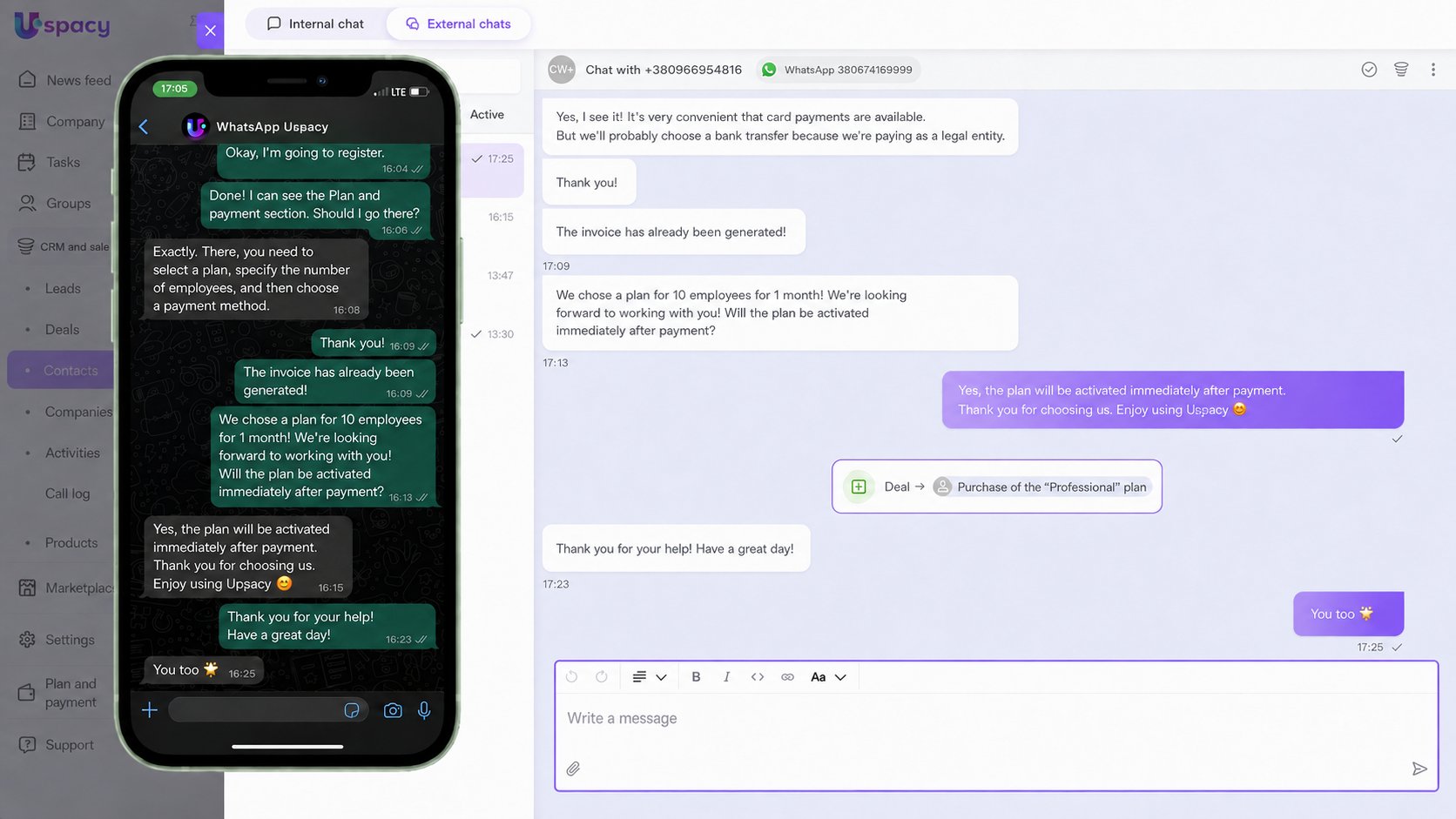
All WhatsApp inquiries — in your Workspace chat
A customer writes to the company via WhatsApp, and the team receives the message in Uspacy External Channels. Managers no longer need to constantly switch between different apps to check new WhatsApp customer inquiries and quickly start working with them.
Uspacy helps organize a unified chat for WhatsApp messages, where you can see the conversation, the responsible employee, and follow-up actions. This way, WhatsApp customer communication does not remain in managers’ personal accounts but becomes part of a transparent workflow.
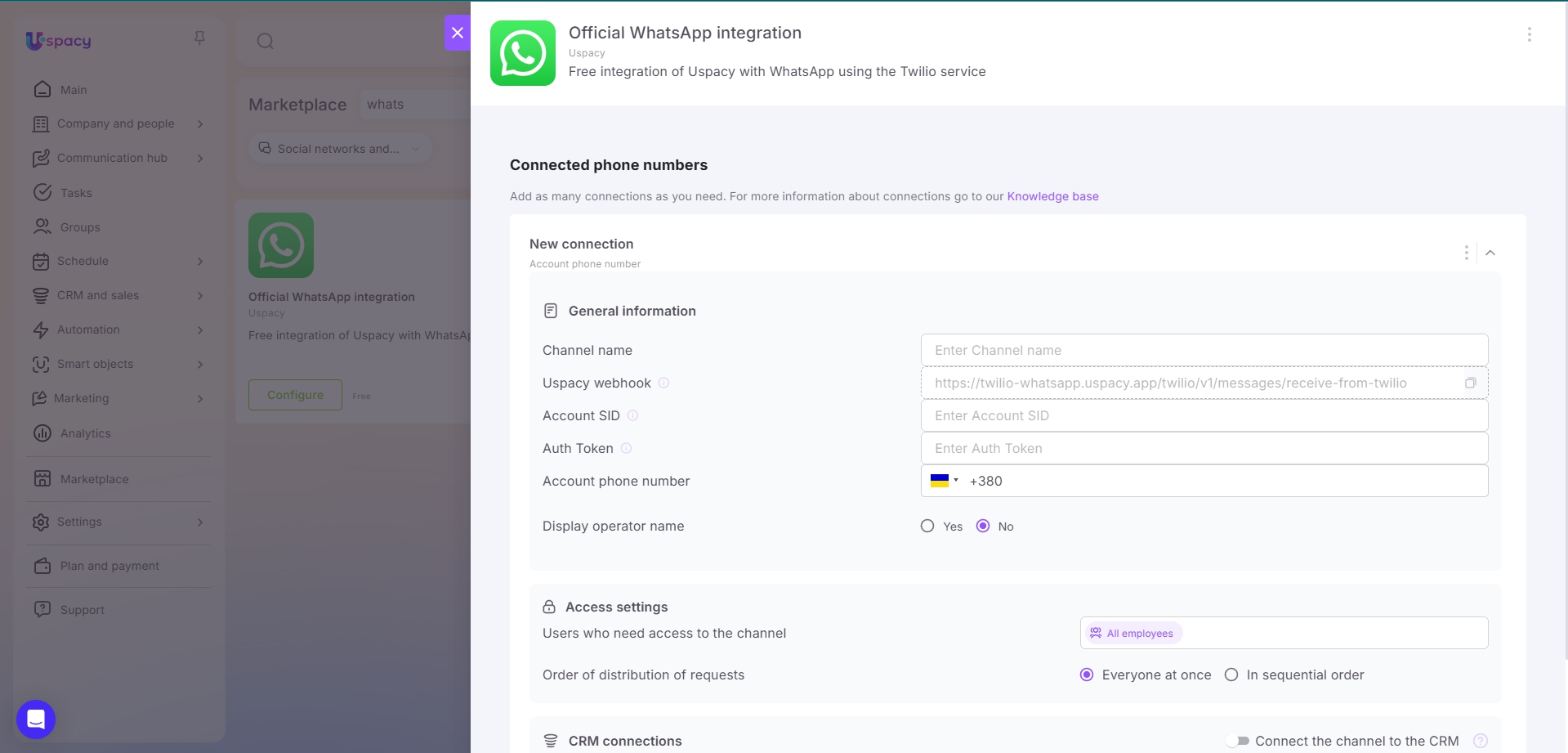
How to connect WhatsApp to Uspacy via Twilio
To connect WhatsApp to CRM Uspacy, the Twilio service is used. For the integration to work correctly, you need to configure both Twilio and Uspacy so that WhatsApp messages can be delivered to the External Channels of your Workspace.
In the WhatsApp app settings in Uspacy, you need to copy the Uspacy webhook and add it to the corresponding field in Twilio. Then, enter the Twilio data — Account SID, Auth Token, and the account phone number — in the WhatsApp app settings in your Workspace.
After that, WhatsApp via Twilio delivers customer messages to Uspacy, and the team can manage them in a single workspace. Connecting WhatsApp to Uspacy via Twilio helps avoid losing inquiries, respond to chats faster, and link conversations with CRM processes.
CRM connections: from a conversation to a lead, contact, company, deal, or task
A WhatsApp chat in CRM helps not only reply to customers but also preserve context for further work. WhatsApp conversations in CRM can be linked to leads, contacts, companies, or deals, allowing the team to see who reached out, what was discussed, and what stage the sales process is currently at.
If your team is looking for a way to save WhatsApp chat history in CRM without manually copying messages, Uspacy helps do this through connections with CRM elements. The conversation remains in the card of the linked lead, contact, company, or deal, allowing managers to quickly review previous communication and return to the chat to continue working with the customer.
When an action within the team is needed after a conversation, a WhatsApp inquiry can be linked to a task. This way, managers don’t have to keep agreements in their heads or separate notes but can immediately record them as a clear next step for themselves or a colleague.
Teamwork without losing customer messages
Uspacy helps organize a CRM for WhatsApp messages so that only the employees who need access can work with the channel. Inquiries can be distributed among managers, helping the team clearly understand who is responsible for each conversation and what needs to be done next.
For sales, support, and service teams, this means faster responses, less communication chaos, and better control over customer inquiries. When it is clear how to manage WhatsApp inquiries in CRM and how to reply to customers from WhatsApp in CRM, the team works more consistently, and customers receive answers without unnecessary delays.
Inquiry processing automation helps reduce the number of manual actions where supported by Workspace settings. In this format, WhatsApp messages are not scattered across separate chats but become part of a unified customer workflow in Uspacy.
WhatsApp for customers, Uspacy for structured team work
The WhatsApp integration helps keep a convenient communication channel for customers while allowing the team to manage messages, CRM connections, responsible employees, and next steps in one Workspace. This way, the business does not just reply in a messenger but manages customer inquiries systematically.