Google and CRM in one workspace: 4 Uspacy integrations that simplify the team’s workday
July 29, 2026
7-minute read

Dmytro Suslov
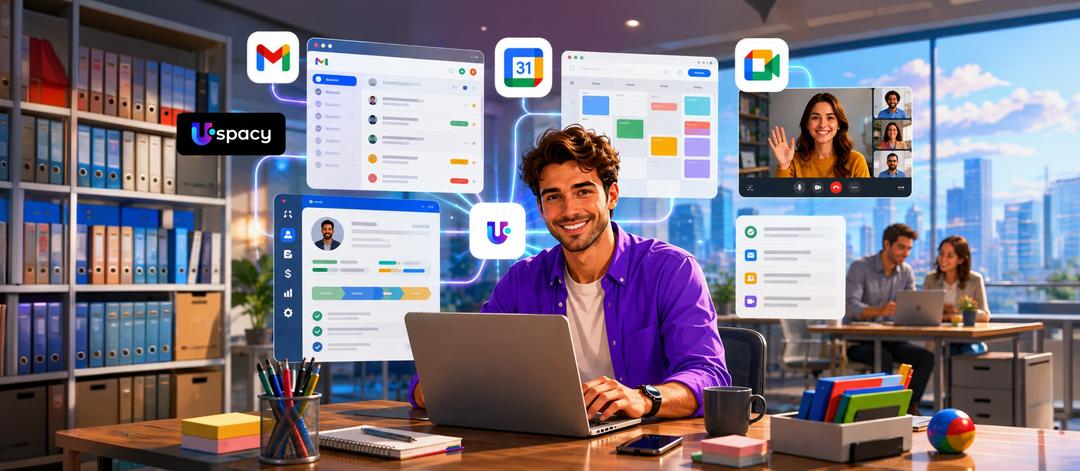
Google services remain familiar team tools, but now they work together with the CRM. Email, calendars, and online meetings are connected with customer data, helping teams move faster from a message to an agreement and the next action.
In addition to CRM, managers work daily with tools from the Google ecosystem — Gmail, Google Calendar, and Google Meet. To reply to customers, schedule calls, or check agreements, they have to constantly switch between services. Some data is transferred manually, and the work context can easily get lost between tabs.
Uspacy integrations do not replace the Google services your team already uses. They connect email, calendars, and video meetings with customer data and workflows. Let’s explore how combining Google services with a CRM helps reduce switching between tools and complete everyday tasks faster.
Why Integrate Google Services with a CRM?
Each service performs its own function well. However, without integration, email correspondence remains in the inbox, events stay in the calendar, links are scattered across chats, and the customer’s history is kept in the CRM.
A typical workflow looks like this: a manager receives an email, searches for the contact in the CRM, creates an activity, opens Google Meet, and copies the meeting link. One such sequence may seem like a minor task. However, repeating it dozens of times throughout the day creates unnecessary workload and increases the risk of errors.
Integrations eliminate the most common gaps in the workflow:
- reduce the number of times users need to switch between services;
- minimize manual data entry and transfer;
- speed up the transition from a message to an action;
- preserve a more complete context of customer interactions;
- reduce the risk of missing an email, activity, or meeting.
As a result, the team spends less time and attention on technical steps. This leaves more time for communication, preparing proposals, and following up.
Let’s start with two of the simplest features: working with Gmail in the CRM and signing in quickly with Google.
Gmail in CRM and Google Sign-In: A Simpler Start to the Workday
A connected Gmail account allows users to work with emails directly in the Uspacy workspace. Managers can receive incoming messages and reply to them without having to open a separate Gmail tab as often.
For example, a customer sends a follow-up question about a commercial proposal. The manager sees the email in Uspacy, reviews the customer profile and the deal, prepares a response, and schedules the next activity.
This way of organizing work provides several practical benefits:
- email correspondence becomes part of the team’s daily work in the workspace;
- messages are easier to associate with a customer or deal;
- important emails are less likely to go unanswered;
- it is easier to create the next activity right after communication.
- the team works with email and customer data in a single context.
Google Sign-In simplifies another regular step — logging into Uspacy. A registered user selects their Google account and signs in without entering a separate Uspacy password. The email address of this account must exactly match the user’s login in the system.
This is convenient for companies where Google accounts have already become the primary work accounts. A new employee can adapt to the workspace faster, and starting the workday requires one less step.
Once email and access are organized, the next step is to connect the calendar and video meetings with the workspace.
Google Calendar and Google Meet: from agreement to a ready-to-join meeting
Separate calendars can quickly create confusion. A manager plans an activity in the CRM, but checks availability in an external calendar and manually transfers the event.
The integration synchronizes Uspacy activities with a personal Google Calendar. Two-way synchronization and two one-way scenarios are available, allowing the company to choose the workflow logic that best fits its needs.
For the daily schedule, this means:
- less event duplication;
- a lower risk of scheduling two meetings at the same time;
- work activities are visible in the calendar users already know;
- schedule changes are easier to track;
- meetings retain a connection with the CRM process.
The manager sees the workday as a whole instead of piecing it together from multiple schedules. This makes it easier to manage workload and respond to changes on time.
Google Meet completes the next step. With the connected integration, a manager can add a video meeting link when creating an activity in Uspacy without opening a new tab.
For example, a customer agrees to a product demo. The manager creates an activity, specifies the date and time, and adds a Google Meet link. If Google Calendar synchronization is enabled, the event will automatically appear there as well.
Calendar helps plan meetings, while Meet immediately creates a space for online calls. Together, they simplify the journey from agreement to the actual meeting.
To see the overall effect, let’s consider all four integrations throughout a single workday.
How Google integrations work together throughout a workday
Each integration removes a small individual action. Together, they create a seamless process where managers leave Uspacy less often and do not need to gather context from multiple tabs.
In the morning, they sign in to the workspace using their work Google account. There is no need to remember a separate password or start the day by recovering access.
Next, the manager sees a new email from a potential customer in the connected Gmail inbox. They read the message, check the contact details, and reply.
After a short email exchange, the customer agrees to an online presentation. The manager creates an activity in Uspacy, selects the date, and adds a Google Meet link. The meeting automatically appears in Google Calendar connected to the workspace, alongside other events scheduled for that day.
Before the meeting starts, the manager opens the activity and joins the video call. After the conversation, they return to the CRM, record the outcome, and plan the next step.
The entire journey — from the first email to the meeting summary — remains connected to the customer. Each integration individually removes several steps, and together they eliminate constant switching between services.
Start with the integration that solves the most noticeable problem. Once the team confirms that the workflow works, they can gradually connect other tools.
Google and CRM in one workspace: fewer tabs, more context
The four integrations solve different parts of the same process. Their shared value lies in connecting communications, schedules, and customer data.
- Gmail helps work with emails alongside customer data;
- Google authentication simplifies signing in to Uspacy;
- Google Calendar brings work events together in a single schedule;
- Google Meet speeds up the organization of online meetings;
- together, the integrations maintain a consistent workflow context.
Saving a few minutes is only the first result. The team is less likely to miss commitments, has a clearer view of the next steps, and can respond to requests faster.
In this scenario, Uspacy works as more than just a CRM. It is a comprehensive set of tools for sales, communications, activities, and collaboration. The company gets a single entry point instead of a collection of disconnected services.
You do not need to connect everything at once. Start with Gmail, Google Calendar, or a video meeting service — depending on where your team spends the most time.
Updated: July 29, 2026
More materials on the topic
CRM for online stores: how to automate orders, payments, and shipping
October 16, 2026
Internet payment processing in CRM: how to accept and track payments with Uspacy as an example
October 9, 2026
Weblium and Wix inquiries and orders: how to build a streamlined CRM process
October 7, 2026
FAQ
Which Google services can be connected to Uspacy?
What are the benefits of connecting Gmail to CRM?
How does Google Calendar synchronization work?
Can you create a Google Meet meeting directly in Uspacy?
Who can sign in to Uspacy using Google?
Uspacy is improving and developing at an incredible speed
Learn about product development plans
Uspacy roadmap 🚀