One of the keys to effective work in CRM is a properly organized client and sales database. But duplicates can significantly influence it.
If there are a lot of contacts, companies, leads or deals, then the data in them can definitely be duplicated. This happens for many reasons. For example, managers entered the data of the same client into the database, because this client contacted the company using different accounts in the social network.
Therefore, it is important to know how to work with possible duplicates and unload your CRM database.
How to merge duplicate CRM elements?
🌟The possibility to merge CRM elements is available only on commercial plans. You can read more about the plans on this page.
First, go to the page of the entity you plan to work with.

Next, mark the duplicates.

And click on the Merge button.
🌟Please note that this possibility depends on the user's access to edit or delete entity elements:
🟣 if there is a complete ban on these actions, then it will not be possible to merge;
🟣 if the user can both edit or delete, then merging will be available.
🟣 if access to the above actions is given only to "own" elements, then only they can participate in the merging. If you mark elements of other persons responsible, then there will be a restriction on them.
Administrators and the Space owner can merge elements with no restrictions.

💡Please note that only 10 elements can be merged at the same time.

A window will open where you need to:
🟣 Select an element that will become the main one. This means that it will remain in the database as a result of merging. It will have its ID and will be edited.

Such an element will become the initial Result of merging.

💡In addition, the values of the immutable fields will be taken from the main element. This is certain system information about its creation and update date, as well as UTM tags.

🟣 Select the desired values for specific fields, except for immutable ones. That is, you can drag information from all existing duplicates into the element that will remain as a result.
For some fields that are not multiple (have a dot as a mark), the value is replaced completely.

For those that are multiple (have a tick), just new data is added. For example, standard fields such as Phone and Email can contain multiple values.

💡For convenience, you can use a special button to activate the Only differences mode and show those fields that are different for all duplicates. And hide those that completely match the values.
For example, if there are some empty fields in all duplicates, they will not be shown in this mode. As well as those containing the same values for all elements which take part in merging.

When it is ready, just click Merge.

The system will quickly process the data and there will be only one element left in the list as a result.

Features of merging duplicates
🟣 After merging, all activity records, i.e. notes, events, activities, tasks, files, documents, chats, calls, etc. are transferred from duplicates to the card of the element left in the database.
🟣 After merging contacts or companies from duplicates, the deals attached to them are also transferred to the left element.
🟣 After merging, for elements of other entities that are related to the element left in the base, the binding will be updated. That is, if there was a binding to duplicates, now they will exist with the current element.
For example, smart object elements Project 1 and Project 2 have Tom and Jerry contacts

We decided to merge them.

We select Tom as the main contact.

The result of merging is the contact named Tom. It will still be bound to Project 1, but will now also be bound to Project 2. This binding is transferred from the duplicate Jerry that has already been removed from the system.

Duplicate search when adding elements
In addition to merging existing duplicates in the database, you can also control for duplicates when adding elements (leads, contacts, companies). The built-in search feature will assist you with this.
🌟 This option is only available on commercial plans. You can find more details about the features of all plans on the pricing page.
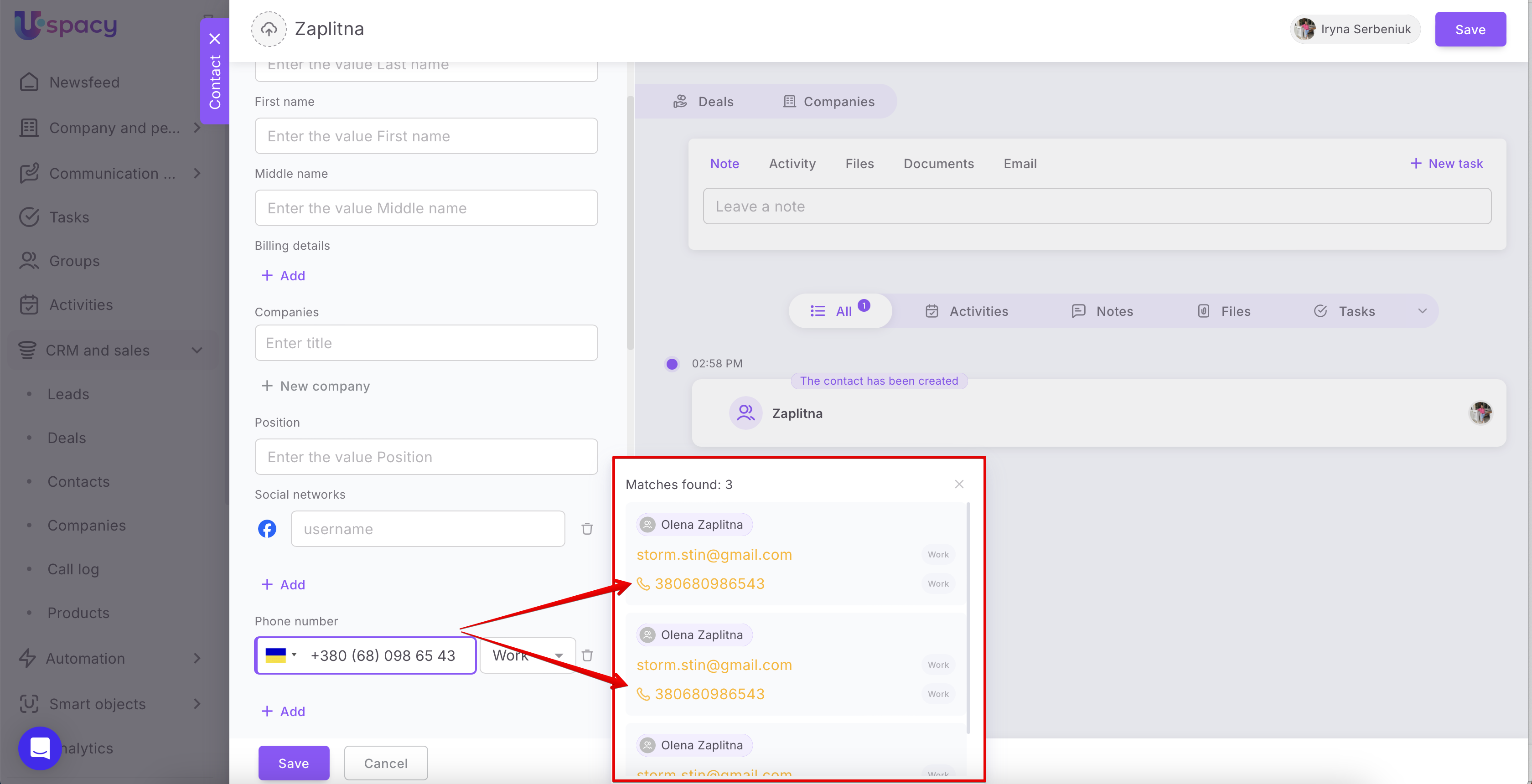
If the system finds an exact match by phone number, you will see a corresponding notification next to the field.

The same applies to email addresses.

Thus, at the stage of filling out the form, you will already know if there is an element or elements with that phone number or email in your database.
💡 Please note that the duplicate search during creation is conducted within the entity you are currently working with. For example, if you are adding a lead, the system will show leads with the same phone number or email.
However, if you decide to save the new element despite the existing contact data in the database, you will receive an additional warning about a potential duplicate.

After clicking the Create a duplicate button, another element will appear in your database that will replicate the contact details of other contacts (companies or leads).

If you have additional questions or you need to contact the support, send a request to this email [email protected]
Created: May 20, 2024 / Updated: October 8, 2024