When creating each new group, it is necessary to specify its type. Not doing this, the system will simply not allow you to successfully complete your actions and add the group to the Space.
You can read more about creating a new group in the following article.
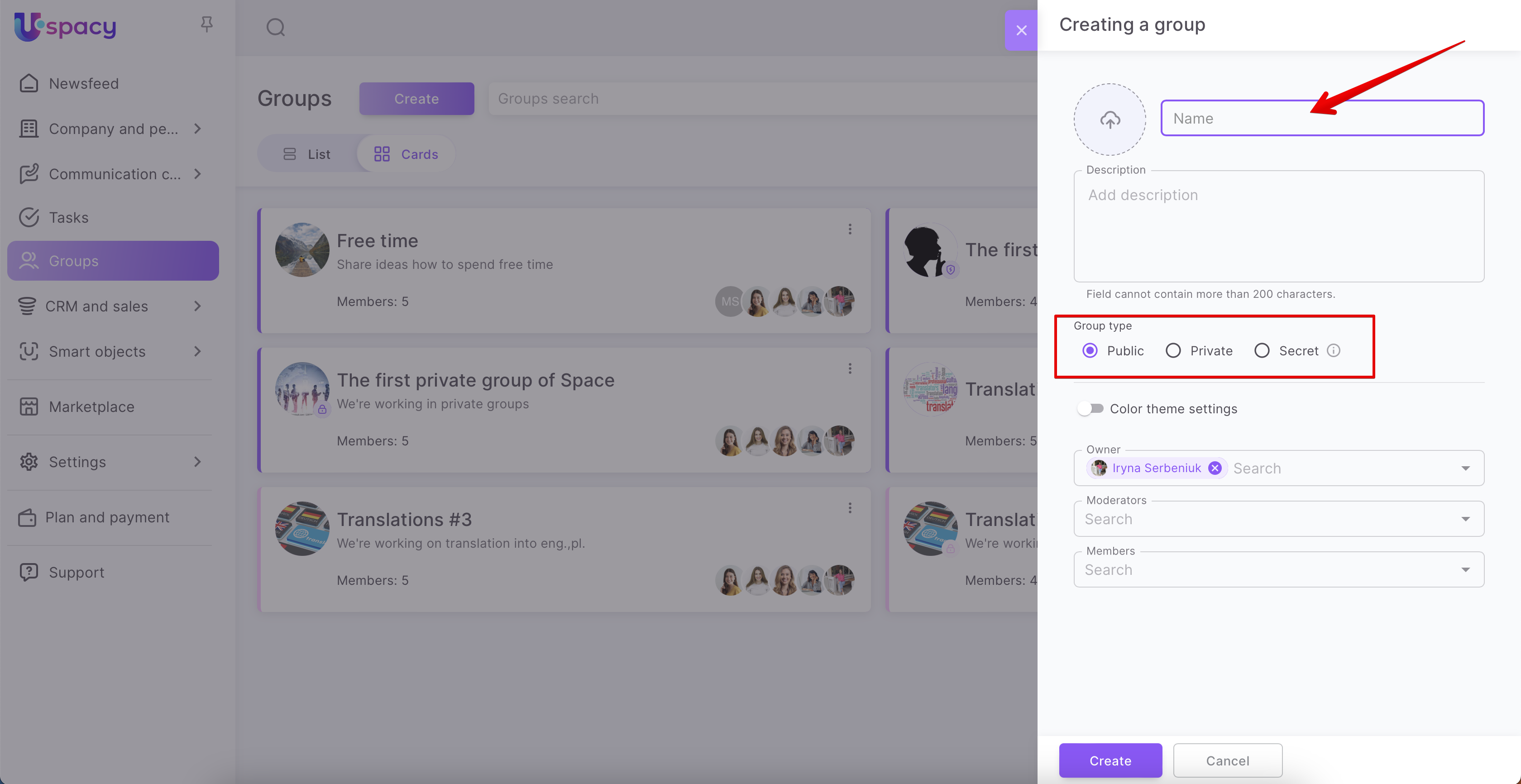
💡 Although the type is set at creating, it can be changed at any time by editing.
Each type is characterized by a certain level of access for users of the Space. So, let’s provide some more details about each of them.
Public group

A group of this type is available on the Space groups page to any user (both members and non-members of the group).

It can be easily found in the search. This can be useful when you have quite a lot of groups in your Space.

Public groups do not have any additional icon next to their image.

❗️When a user who is not yet a member of the group opens it, he/she does not see the content (posts published here and tasks created).
There is a feature. Administrator and super administrator can see tasks that are bound to this group (both in the general list and by clicking on the link to such a task), even if they are not its members.
Of course, anyone can easily join a group of this type.

And then leave it at any moment.

After the user has become a member of the group, he/she can write and publish posts in the group, work on tasks, message to a chat if it is created for this group or create it, and also view information about the group.

Private group

A group of this type is available on the Space groups page to any user (both members and non-members of the group)

Similarly to public groups, private groups can be easily found in the search.

Groups of this type have an additional symbol next to the image.

❗️When a user who is not yet a member of a private group opens it, he/she does not see the content (posts published here and tasks created). Also, he/she cannot simply join the group. To become a member, you need an owner to accept you.
As for public groups there is a feature. Administrator and super administrator can see tasks that are bound to this group (both in the general list and by clicking on the link to such a task), even if they are not its members.
Everyone can send a request to this group.

The group owner manages requests through the About group information window.

In the Department staff block, the owner can Accept or Reject the request.

After the owner accepts the user to join the group, the user who sent the request will become a member.
The user will be able to view information about the group, message to the chat if it is created for this group or create it, and also leave the group at any time.

And, of course, with the rights of a member, the user can write posts in the group and create tasks.

Secret group

A group of this type is not available on the Space groups page for users who are not members of that group. Also, they will not be able to find it in the search.

Only the owner, moderators and members can see the secret group on the groups page.

Groups of this type have an additional icon next to the image.

You can get into secret groups only if the owner adds the user to the department staff. That is, the owner will specify him/her as a moderator or make him/her an ordinary member of the group.
🔍 You can read more about editing groups in the following article.

After that, the user becomes a member. Now he/she can see this group in the general list. And can find this group in the search.

The user now has access to view the group and interact with it. Can write and publish posts in the group, work on tasks, message to a chat if it is created for this group or create one, and view information about the group.
❗️ According to the general rule, the administrator and super administrator of Space will not have access to the secret group until they become its members. But there is one feature. They can see tasks that are bound to a secret group (both in the general list and by clicking on a link to such a task), even if they are not members of it.

Of course, a member can leave the secret group at any time. After such actions, it will not be displayed for him/her again in the general list of the Space and the user will not be able to find it in the search.

If you have additional questions or you need to contact the support, send a request to this email [email protected]
Created: March 17, 2023 / Updated: January 9, 2026